Remove Digital Footprints from Online Platforms: A Comprehensive Guide
Understanding Your Digital Footprint
Every time you engage online, whether it's browsing, shopping, or commenting on social media posts, you leave a digital footprint. This trail of data can be used to track your online activities, making it essential to take control of your digital presence and remove unwanted footprints. In this guide, we'll walk you through the process of deleting digital footprints from online platforms and provide you with the necessary tools to protect your online privacy.
What is a Digital Footprint?
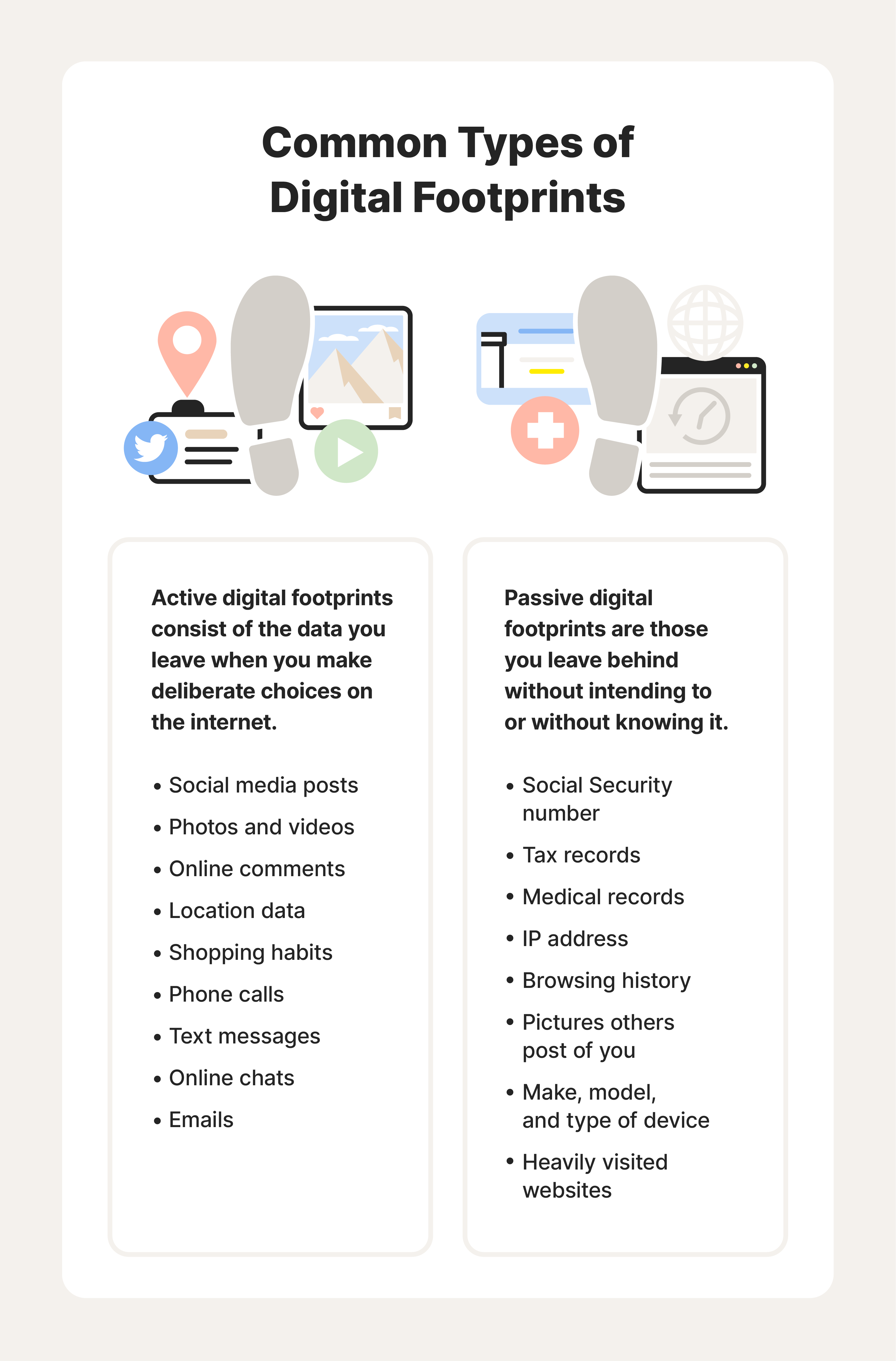
A digital footprint refers to the sum of your online presence, including both intentional and unintentional data trails. This can include social media posts, online accounts, metadata, and tracking logs. The larger your digital footprint, the more vulnerable you are to scams, identity theft, and reputation damage.
Why Remove Digital Footprints?
Removing digital footprints from online platforms is crucial for several reasons:
- To reduce the risk of harassment and cyber attacks
- To protect your online identity from theft and misuse
- To minimize your online presence and maintain a positive reputation
- To safeguard your personal data and prevent it from being misused
7 Powerful Ways to Remove Personal Data Online
Here are seven ways to delete your digital footprints from online platforms:
- Delete Social Media Accounts: Remove unnecessary social media accounts, and delete old posts and comments.
- Use Data Broker Opt-Out Tools: Utilize data broker opt-out tools to remove your personal data from public directories.
- Clear Browser Cookies and History: Regularly clear browser cookies and history to prevent tracking.
- Remove Online Footprints from Old Forums and Sites: Use the guide provided to clear digital footprints from old forums and sites.
- Disable Advertising Identifiers: Disable advertising identifiers (Ad ID) to reduce your digital footprint.
- Remove Publicly Available Information: Remove publicly available information, such as phone numbers and addresses, from online directories.
- Use a VPN and Antivirus Software: Use a virtual private network (VPN) and antivirus software to protect your online activity and prevent malware.
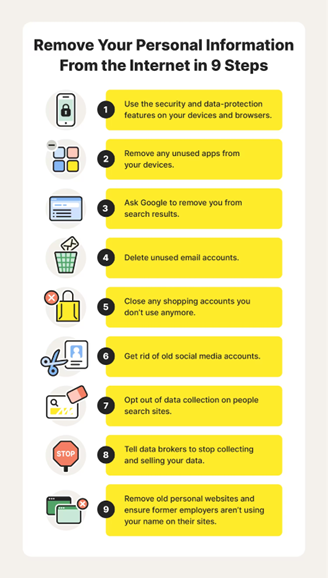
How to Delete Your Digital Footprint: A Step-by-Step Guide
Here's a step-by-step guide to deleting your digital footprint:
- Search for Your Digital Footprint: Conduct a search for yourself to see what information is publicly available online.
- Identify Unnecessary Accounts and Posts: Remove unnecessary social media accounts and delete old posts and comments.
- Use Data Broker Opt-Out Tools: Utilize data broker opt-out tools to remove your personal data from public directories.
- Clear Browser Cookies and History: Regularly clear browser cookies and history to prevent tracking.
- Remove Online Footprints from Old Forums and Sites: Use the guide provided to clear digital footprints from old forums and sites.
- Disable Advertising Identifiers: Disable advertising identifiers (Ad ID) to reduce your digital footprint.
- Remove Publicly Available Information: Remove publicly available information, such as phone numbers and addresses, from online directories.
- Use a VPN and Antivirus Software: Use a virtual private network (VPN) and antivirus software to protect your online activity and prevent malware.
Conclusion
Removing digital footprints from online platforms is a crucial step in maintaining online privacy and security. By following the guide provided, you can take control of your digital presence and reduce the risk of harassment and cyber attacks. Remember to regularly search for your digital footprint, remove unnecessary accounts and posts, and use data broker opt-out tools to protect your personal data. By taking these steps, you can ensure a safer and more secure online experience.
Additional Resources
For further guidance on removing digital footprints from online platforms, we recommend exploring the following resources:
- Delete Your Digital Footprint: The Complete Guide
- How to Reduce Your Digital Footprint
- A Guide on How to Remove Your Digital Footprint
Final Tips
Remember to always be cautious when engaging online, and take regular steps to protect your digital presence. By following the guide provided and staying informed, you can ensure a safer and more secure online experience.