Basic Computer Security for Beginners: A Newbie's Guide to Safeguarding Your Digital World
In today's digital age, cybersecurity has become an essential aspect of our lives. With more and more of our personal and business data being stored online, it's not uncommon for individuals to worry about the safety of their digital world. If you're one of them, this guide is for you! In this article, we'll cover the basics of computer security for beginners, helping you understand the importance of protecting your digital assets and providing you with the essential knowledge to keep them safe.What is Basic Computer Security for Beginners?
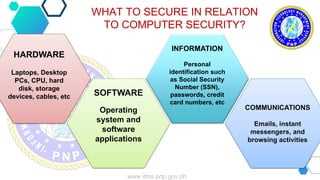
Basic computer security for beginners, also known as cybersecurity fundamentals, refers to the practice of protecting devices, accounts, networks, and data from unauthorized access, misuse, or damage. It involves understanding and using practical controls such as strong authentication, secure settings, updates, and safe practices to prevent common threats like phishing, malware, and credential theft.Understanding the Threats
To build strong digital defenses, it's essential to understand the types of threats you might face. Some common threats include:- Phishing attacks: Scams designed to trick you into revealing sensitive information like passwords or credit card numbers.
- Malware: Software designed to harm or exploit your device, such as viruses, Trojans, or spyware.
- Ransomware: Malware that demands payment in exchange for restoring access to your data.
- Credential theft: Unauthorized access to your accounts using stolen passwords or login credentials.
- Buffer overflow attacks: Exploiting vulnerabilities in software to gain unauthorized access.
Essential Practices for Basic Cybersecurity

- Keep your software up-to-date: Ensure you're running the latest versions of your operating system, browser, and other software to prevent known vulnerabilities.
- Use strong passwords: Use unique, complex passwords for each account, and consider using a password manager.
- Enable two-factor authentication: Add an extra layer of security to your accounts using codes sent to your phone or biometric authentication.
- Back up your data: Regularly backup your files to a secure location, such as an external hard drive or cloud storage.
- Use antivirus software: Install reputable antivirus software to detect and remove malware.
- Be cautious with emails and links: Avoid suspicious emails and links, and never download attachments from unknown sources.
- Use a VPN: Consider using a virtual private network (VPN) for secure browsing, especially when using public networks.
Staying Informed and Educated
Cybersecurity is a constantly evolving field, and staying informed is key. Here are some resources to help you learn more:- Cybersecurity courses for beginners: Websites like Coursera, Udemy, and edX offer a range of beginner-friendly courses covering the basics of cybersecurity.
- Online communities: Join online forums or communities like Reddit's r/cybersecurity to stay updated on the latest threats and best practices.
- News and blogs: Keep up-to-date with the latest cybersecurity news and trends by following reputable sources like Cybersecurity News and The Hacker News.

![Best Beginner Cybersecurity Courses & Certificates [2026] | Coursera](https://i.ytimg.com/vi/9_IEcEl5BZI/maxresdefault.jpg "Best Beginner Cybersecurity Courses & Certificates [2026] | Coursera")
![Fundamentals of Cybersecurity [2026 Beginner's Guide]](https://imgv2-2-f.scribdassets.com/img/document/921346570/original/f59c63d866/1?v=1 "Fundamentals of Cybersecurity [2026 Beginner's Guide]")

![How To Learn Cybersecurity on Your Own [Beginner's Guide]](https://cdn5.slideserve.com/9577436/basic-computer-security-dt.jpg "How To Learn Cybersecurity on Your Own [Beginner's Guide]")